1. Blog
  2. Article

Canonical
3 August 2017

Upgrading your Ubuntu-on-Windows install to the app version


Our team and Microsoft recently released Ubuntu as a Windows app store application! If you toyed with the “bash on Ubuntu on Windows” version before and would like to try the latest and greatest, read on!
Saving your data

If your “bash on ubuntu on windows” environment has some data you’d like to keep, make sure you back it up now. The uninstall process will nuke everything.

Uninstall the old way

This is relatively simple. Opening a command line (cmd.exe) terminal and typing

lxrun /uninstall

will destroy your previous environment.

Installing the new way

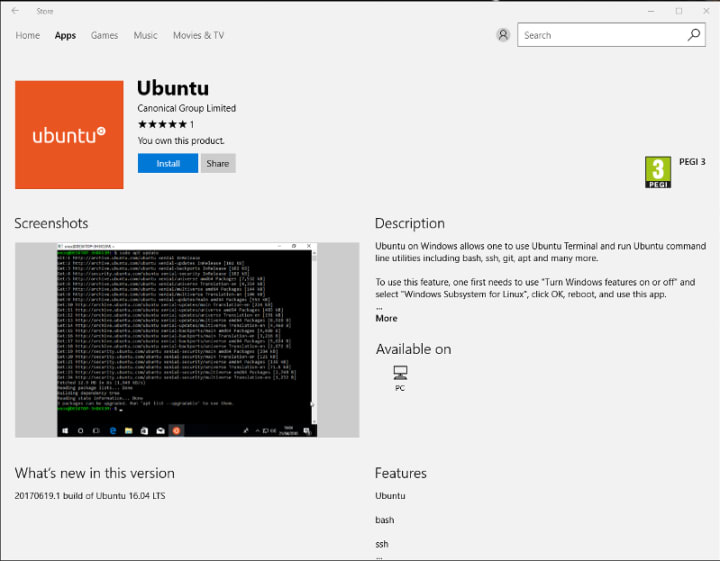
To find the app in the Microsoft store, just type “Ubuntu” in the search bar. Click install. Voilà!


Related posts

Designing a better future: your guide to design contribution in Open Source

This guide covers why design matters in open source, and how designers can make a bigger impact in open source software.

How to build, maintain, and secure infrastructure for AI factories

Moving AI into production creates a long-term maintenance obligation for the software behind it. GPU infrastructure can remain in service across several generations of models...

Why embargoes matter for open source security

Open source is built on a foundation of transparency, collaboration, and speed. We share code, we share ideas, and together, we build better software. But when it comes to...

From personas to archetypes: a living, shared understanding of the people we build for (Part 2 of 2)

This is the second of two posts on our archetypes, shared, machine-readable descriptions of the people we build for. The first covers why we needed them and what they are. This...